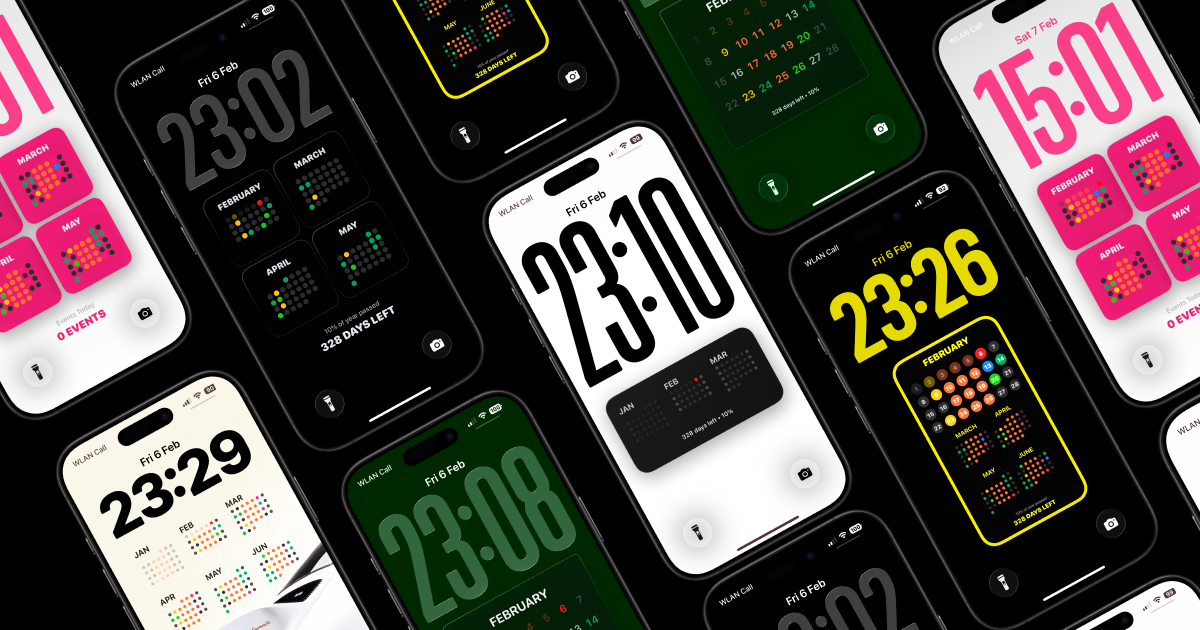
Calendarly turns your calendar into a live Lock Screen wallpaper that updates automatically throughout the day. See your schedule the moment you pick up your phone without needing to configure widgets or open apps.
Calendarly is an iPhone app that transforms the Lock Screen into a live, automated calendar wallpaper, making it the first tool of its kind to integrate the schedule directly into the Lock Screen display. It is designed for anyone who wants to see their appointments, meetings, and events the moment they pick up their phone, without tapping or swiping. The core value is instant visibility and focus, reimagining how users interact with their daily agenda. By integrating directly into the Lock Screen, Calendarly ensures that the schedule is always front and center, eliminating the need to open a calendar app or configure complex widgets. Users simply install the app, grant calendar access, and their schedule becomes a permanent part of the Lock Screen display, updating automatically throughout the day.
The concrete problem Calendarly solves is the friction of accessing one's calendar. Users often have to unlock their phone, navigate to an app, or set up widgets that require manual configuration. This extra step can lead to missed events or wasted time. Moreover, traditional widgets are static and not always updated in real time. Calendarly addresses this by placing the calendar directly on the Lock Screen, where it updates automatically. This matters because it reduces cognitive load; the user does not have to remember to check their schedule. Instead, the schedule is always visible, allowing for better time management and fewer surprises. The result is a more focused and organized day, as the most important information is available at a glance.
The first major feature group is the automated calendar integration. Calendarly syncs with the user's iPhone calendar and displays events, meetings, and reminders on the Lock Screen as a live wallpaper. This integration is fully automatic; once set up, the calendar updates throughout the day without any manual intervention. The benefit is that users always see their current and upcoming schedule without having to open an app or swipe to a widget screen. This feature is especially useful for those who frequently check their phone for upcoming commitments. By removing the extra steps, Calendarly ensures that schedule information is never more than a glance away, promoting punctuality and reducing the chance of missing important appointments.
The second major feature group is full customizability. Calendarly offers a range of preset layouts and templates that users can choose from. They can then adjust spacing, margins, font styles, and colors to match their personal aesthetic. The app provides unlimited color combinations, allowing for complete personalization. This is not just about appearance; customization also improves readability. Users can select fonts and sizes that work best for their eyes, and adjust spacing to avoid clutter. The ability to personalize every detail ensures that the Lock Screen calendar fits seamlessly with the user's wallpaper and overall iPhone theme. This level of control makes the calendar feel like a native part of the device, enhancing the user experience and encouraging consistent usage.
Publisher
A
admin
Launch Date2026-02-18
Platformmobile
Pricingpaid
Domain Authority
Ahrefs DR4/100
Traffic Insights
Month2026-01
Estimated Visits0
MoM Visits GrowthN/A(+0)
Avg Time on Site0s