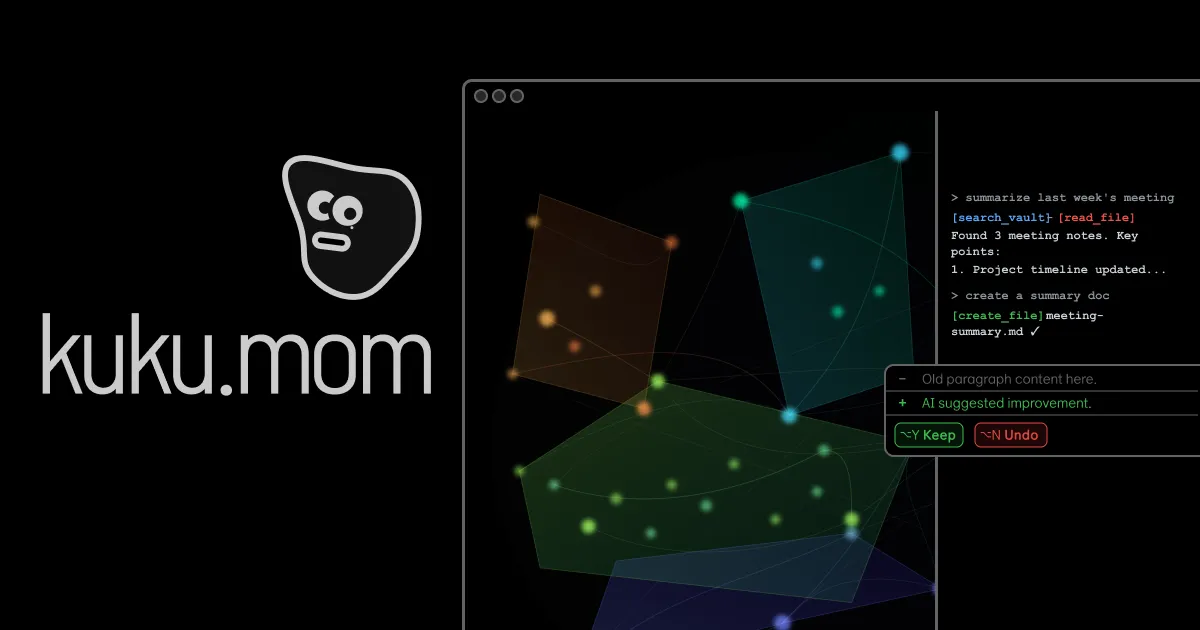
Kuku is an AI-native Markdown editor specifically designed for macOS, built to help users connect their thoughts and write more intelligently by leveraging artificial intelligence within a local-first, Markdown-centric environment. It serves as a powerful tool for knowledge workers, writers, developers, and anyone who manages extensive notes or documentation, aiming to transform scattered ideas into a coherent, interconnected knowledge base. The primary purpose is to provide instant context and maintain a continuous flow of thought by deeply integrating AI capabilities with the familiar structure of plain Markdown files, all while ensuring user data remains private and under their full control without reliance on cloud services or vendor lock-in.
Traditional note-taking and knowledge management often involve switching between applications, losing context, and struggling to recall or connect related ideas from a growing vault of documents. Users face the pain of interrupting their creative or analytical flow to manually search for information, manage file links, or reconstruct the thread of previous thoughts. This fragmentation leads to decreased productivity, lost insights, and knowledge that remains siloed and underutilized, as tools either lack intelligent assistance or compromise on privacy by requiring cloud synchronization and data uploads.
One of the first major feature groups is instant context retrieval, where Kuku provides answers from your notes in under a second through a command palette interface, ensuring you never lose your train of thought. It learns from past sessions, reusing answers as suggestions for future queries, and intelligently suggests follow-up prompts based on the current context to keep thinking moving forward. This capability surfaces related notes, links, and ideas from anywhere in your workspace with a single keystroke, effectively connecting all your documents and making your entire knowledge base immediately accessible without manual searching or navigation.
The second major feature group revolves around native, Markdown-first editing with advanced linking and visualization. Kuku stores all notes as plain .md files, supporting wikilinks and backlinks to create a web of connected thoughts, complemented by a graph view that visually represents these relationships. It understands document structure, intelligently surfaces it during editing, and provides basic blocks for headings, lists, to-dos, quotes, and code snippets. This approach ensures human-readable Markdown remains the source of truth while enabling powerful, non-destructive organization and navigation through your knowledge vault.
admin
Additional capabilities include AI that can read and learn from uploaded documents for instant retrieval, allowing the assistant to search the vault and read files to provide context-aware responses. The editor works fully offline, running locally and never sending user data without explicit permission, aligning with its offline-first, no-cloud-required philosophy. Furthermore, a sync feature carries the entire working context—including Markdown, wikilinks, backlinks, graph state, and AI context—across devices, making the vault feel like one continuous working memory.
Technically, Kuku is built using Tauri instead of Electron, resulting in a lightweight, native macOS application that is fast and resource-efficient. It operates on a local-first architecture where all files are stored plainly on the user's device, with indexing ensuring vault paths stay consistent with graph nodes. The AI integration works locally to search, edit, and link content within the vault, providing reviewable, Cursor-style diffs for transparency, and the entire system is designed to maintain graph consistency and file integrity without requiring an internet connection.
Benefits for users include never losing their train of thought due to instant context access, having a second brain that compounds knowledge over time by strengthening connections between notes, and maintaining complete data ownership and privacy. Measurable outcomes are increased writing and thinking efficiency, reduced time spent searching for information, and the ability to surface insights from existing notes that might otherwise remain hidden, ultimately leading to smarter, more connected work output and better decision-making.
Concrete use cases include planning sessions like Q1 planning, where users can review retrospectives, align on priorities, and track decisions and backlogs with wikilink-aware navigation. For developers, it can manage architecture overviews and code snippets while maintaining links to related documents like team sync notes. Writers can draft interconnected articles, with AI suggesting prompts and summarizing risks, and researchers can upload documents for the AI to learn from, enabling instant retrieval of relevant information across a vast vault of notes.
Target users are knowledge workers, writers, students, researchers, and developers on macOS who value privacy, offline access, and Markdown. It integrates with local file systems using plain .md files and is open source on GitHub. The tech stack includes Tauri for the native macOS build, and it currently offers a free download for macOS with Windows and Linux versions coming soon, emphasizing a no-sign-up-required, try-before-you-commit model that avoids subscription lock-in.
In summary, Kuku transforms note-taking into an intelligent, context-aware experience by combining AI with local-first Markdown editing, providing instant access to connected knowledge while ensuring user privacy and control. It addresses the core problem of fragmented thought and lost context, enabling users to build a compounding second brain that enhances productivity and creative flow, all within a lightweight, native application designed specifically for the macOS ecosystem.
Kuku targets knowledge workers, writers, students, researchers, and developers who use macOS and value privacy, offline access, and Markdown. Ideal users are those managing extensive notes or documentation, seeking to connect thoughts and write smarter with AI assistance without cloud dependency. They prefer plain text files for longevity and control, need instant context retrieval to maintain flow state, and want a lightweight, native app that integrates wikilinks, backlinks, and graph visualization. The tool appeals to users avoiding subscription lock-in, embracing open source transparency, and desiring a second brain that compounds knowledge over time.
Updated 2026-02-28