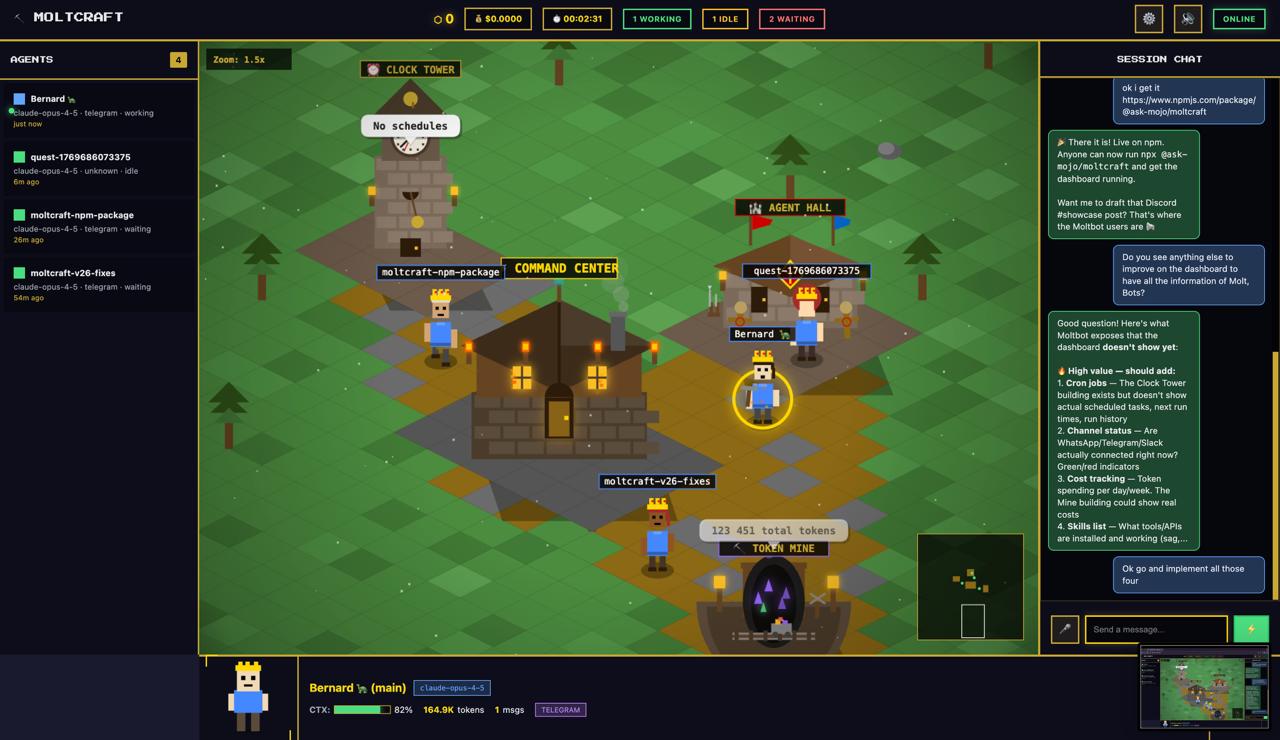
Moltcraft is an open-source isometric pixel dashboard designed for AI agent monitoring, specifically for the Moltbot personal AI assistant ecosystem. It reimagines the category of agent monitoring tools by converting abstract terminal logs into a living pixel world where each AI agent is represented as a character walking around in real-time. The core value is eliminating the need to scroll through endless JSON and terminal tabs, providing instead an immediate, visual understanding of agent activity. This tool targets developers, tinkerers, and Moltbot users who require a more intuitive way to oversee their AI agents' statuses, conversations, and workflows. By turning monitoring into an engaging visual experience, Moltcraft makes it easier to track multiple agents simultaneously without the cognitive load of reading logs.
The traditional method of monitoring AI agents involves juggling multiple terminal windows, scanning through verbose log files, and trying to mentally parse JSON outputs to understand what each agent is doing. This pain point is especially acute for users running several agents concurrently, as context switching between tabs becomes a constant drain on productivity. The lack of a unified, visual overview often leads to missed events, delayed reactions, and overall frustration. Moltcraft addresses this by providing a single dashboard where agent status, token usage, conversations, and interactions are all visible at a glance. Instead of deciphering logs, users see pixel characters moving, buildings displaying real data, and live chat streams — making it obvious when an agent is active, idle, or needs attention. This solves the core problem of inefficient monitoring.
The Living World feature is the centerpiece of Moltcraft's visual approach. As stated on the site, "every agent is a pixel character walking your world in real-time." This works by assigning each AI agent its own pixelated avatar that moves across the dashboard according to its current activity. The benefit is immediate situational awareness: a glance tells you which agents are busy, which are idle, and which are communicating. No more squinting at timestamps or scrolling through logs to find relevant entries. The Living World transforms the abstract concept of agent state into a concrete, spatial representation that the human brain processes effortlessly. For instance, if a character stops moving, you immediately know that agent might be waiting for input or processing a task. This feature dramatically reduces the time spent on monitoring.
admin
The Multi-Agent View allows users to see every agent, their status, tokens, and conversations from a single screen, eliminating the need to switch between six terminal tabs. This consolidated view provides a comprehensive overview of all active agents, their resource usage, and communication threads. Complementing this is the Live Chat feature: simply click on an agent's character to start a conversation. Users can read history, send messages, and watch responses stream in real-time without leaving the dashboard. This means no context-switching between separate tools or windows. The live chat integration makes it possible to interact with agents directly, whether to issue commands, ask questions, or debug behavior. Together, these features create a unified command center for managing multiple AI assistants efficiently.
Voice I/O extends the dashboard's functionality by enabling hands-free interaction. As described, users can "talk to your agents, hear them respond" using built-in voice capabilities. This is particularly useful when users are engaged in other tasks, such as coding or building, and need to communicate with agents without pausing their workflow. The Interactive Buildings feature adds another layer of visibility: clicking on buildings in the pixel world reveals real data such as cron jobs, token usage, skills, and connected channels. Each building represents a different aspect of the infrastructure, making abstract metrics tangible. For example, a token usage building might show a graph or count, allowing instant insight into resource consumption. These features turn the dashboard from a simple monitoring tool into an interactive control panel.
Moltcraft's workflow is designed for simplicity and speed. After installing Moltbot (a prerequisite), users run a single command: npx @ask-mojo/moltcraft. This downloads and launches the dashboard instantly, auto-discovering the Moltbot gateway without manual configuration. The agents then appear as pixel characters in the world. Users can click on any character to chat, view agent details, or inspect building data. The system is lightweight — pure HTML/CSS/JS at about 2MB total — and runs on minimal hardware like a Raspberry Pi. There is no build step, no React dependency, and no complex setup. The entire experience from installation to real-time monitoring takes under 60 seconds. This zero-overhead approach ensures that users can get started immediately and focus on their agents rather than tool configuration.
Concrete use cases for Moltcraft include monitoring a fleet of personal AI assistants that handle various tasks like scheduling, web scraping, and communication. A developer might use the Multi-Agent View to ensure all agents are running correctly, checking token usage and conversation histories from one screen. If an agent is unresponsive, the Living World immediately shows a stationary character, prompting quick intervention via Live Chat. Another scenario involves using Voice I/O while coding: a programmer can issue a command to an agent without touching the keyboard. The Interactive Buildings provide a quick check on cron job execution and skill performance. The outcome is faster problem detection, reduced monitoring fatigue, and a more enjoyable experience overall. Teams or individuals managing multiple agents find that Moltcraft cuts the time spent on status checks significantly.
Moltcraft is built for Moltbot users — AI developers, open-source enthusiasts, and anyone running personal AI assistants on devices like Raspberry Pi, VPS, or laptops. The tech stack (pure HTML/CSS/JS) ensures compatibility across modern browsers without extra dependencies. The entire project is MIT licensed, meaning it is free to use, modify, and even commercially deploy. Users retain full control of their data since the dashboard runs on their own server. A cloud version is in development for those who prefer a hosted solution with no installation required. In summary, Moltcraft transforms AI agent monitoring from a tedious log-reading task into an interactive, visual experience that is both powerful and delightful. Its open-source nature invites community contributions and customization.
AI developers and tinkerers who use Moltbot, the open-source personal AI assistant. System administrators overseeing multiple autonomous agents on Raspberry Pi or VPS. Open-source enthusiasts seeking a visual monitoring dashboard. Moltbot users who want an intuitive alternative to terminal logs and JSON parsing. Anyone managing a fleet of AI agents who values real-time visibility and hands-free interaction.
Updated 2026-02-28