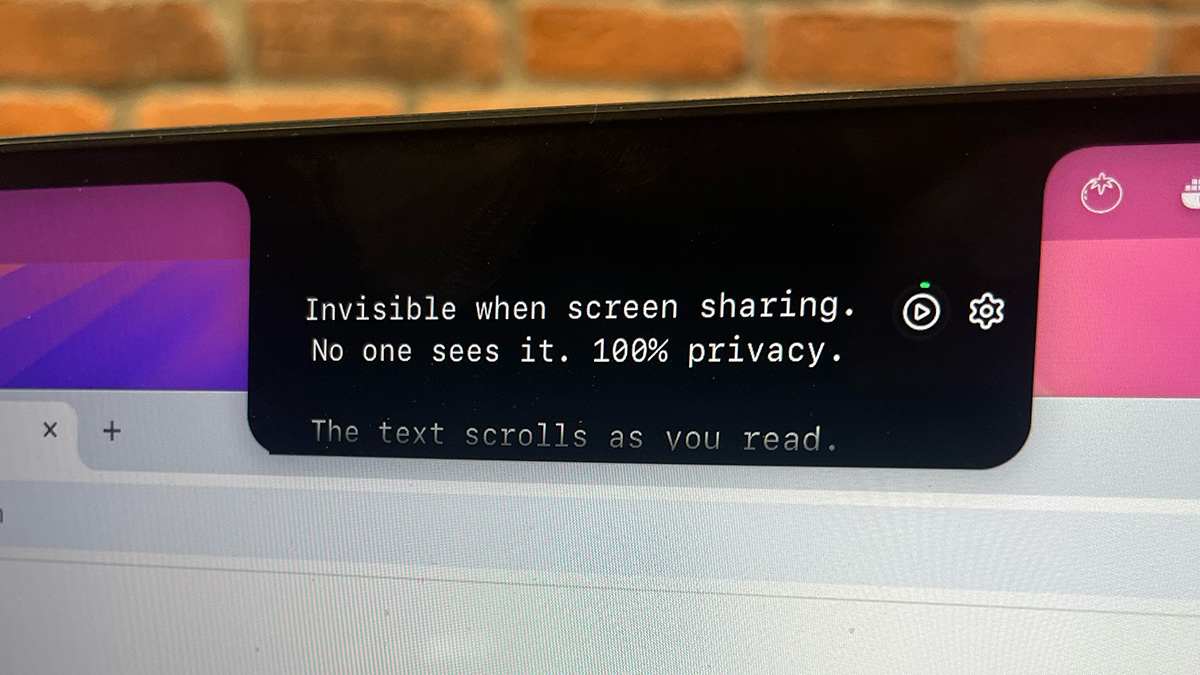
Notchie is a specialized teleprompter application designed exclusively for Mac users, cleverly utilizing the notch area of MacBook displays to provide a discreet script-reading tool that remains completely invisible during screen sharing on video conferencing platforms. This innovative solution targets professionals, creators, founders, and salespeople who need to deliver polished presentations, client calls, sales demos, and recorded content without appearing to read from a script, thereby maintaining natural eye contact and enhancing credibility. The primary purpose is to eliminate the common pitfalls of forgetting key points, sounding robotic, or breaking eye contact during high-stakes communications, transforming users into confident and compelling speakers who can focus on delivery rather than memorization.
Many professionals spend hours preparing for important presentations, client meetings, or content recordings, only to experience mental blocks, awkward pauses, or noticeable eye movements away from the camera when pressure mounts. This not only makes them appear unprepared or unprofessional but can also cost deals, promotions, or opportunities as their credibility diminishes the moment an audience suspects they are reading from a script. Traditional methods like printed notes or on-screen documents often lead to distracting behavior, while conventional teleprompters can be cumbersome, expensive, and require users to match a fixed scrolling rhythm, resulting in unnatural delivery that defeats the purpose of using such aids in the first place.
One of Notchie's standout features is its voice-sync scrolling technology, which listens to the user's voice and adjusts the text scroll in real-time, allowing for natural variations in speaking pace, intentional pauses for emphasis, and spontaneous speed changes without losing place. This adaptive approach ensures the teleprompter follows the user's rhythm rather than forcing the user to conform to a preset speed, eliminating the robotic delivery associated with traditional teleprompters and enabling a more authentic and engaging presentation style that feels unrehearsed yet precise.
Another critical feature is its complete invisibility during screen sharing across all major video conferencing and streaming applications, including Zoom, Google Meet, Microsoft Teams, and OBS. Notchie achieves this by leveraging a special macOS rendering layer that screen capture tools cannot detect, ensuring that the script remains a private aid visible only to the user while the audience sees nothing but the presenter's confident, camera-focused delivery, thus preserving the illusion of spontaneity and thorough preparation.
admin
Notchie also offers extensive customization and control options, such as adjustable window size, font dimensions, background opacity to see underlying meeting notes, and multiple operation modes including classic auto-scroll with adjustable speed. Users can hover over the notch area to pause instantly, use global keyboard shortcuts to adjust scroll speed or navigate text without leaving their current application, and tailor the setup to match their specific camera positioning and workflow preferences for a seamless, frictionless experience.
Technically, Notchie is a native macOS application built for both Apple Silicon and Intel processors, requiring macOS 14 or later, and is optimized for minimal resource usage while providing lightning-fast performance. It operates by positioning a text overlay in the Mac's notch area, utilizing otherwise dead screen space, and employs advanced audio processing for voice detection alongside macOS display layer APIs to ensure screen-share invisibility, all without requiring an account, internet connection, or data collection, keeping scripts entirely private on the user's device.
The benefits for users are measurable and significant, including the ability to deliver presentations flawlessly without forgetting key points, maintaining perfect eye contact with the camera, reducing video recording retakes from multiple attempts to a single take, and walking into high-pressure situations with calm confidence. This leads to tangible outcomes such as closing more deals, securing job offers, producing content faster, and enhancing professional reputation through polished, executive-level delivery that appears both natural and thoroughly prepared.
Concrete use cases include sales professionals using Notchie during client calls to have value propositions and objection handlers readily available, content creators recording videos or webinars in one take without editing mistakes, founders delivering investor pitches with every talking point covered, job candidates navigating interviews with prepared STAR stories and salary points, and remote workers presenting to executives with seamless, stumble-free delivery that showcases leadership qualities and attention to detail.
Target users are creators, founders, sales professionals, remote workers, and anyone who regularly engages in video calls, presentations, or content creation. Notchie integrates seamlessly with all major video conferencing and streaming apps, requires no additional setup or accounts, and is available through a one-time purchase pricing model at $29.99 with a 30-day money-back guarantee, also offered on the Mac App Store, supporting a tech stack that prioritizes privacy, performance, and ease of use without subscriptions.
In summary, Notchie transforms how professionals communicate on camera by providing an invisible, adaptive teleprompter that leverages existing hardware innovatively, enabling users to read scripts naturally while maintaining eye contact, thereby boosting confidence, credibility, and effectiveness in every virtual interaction without the audience ever knowing the secret behind their flawless delivery.
Notchie is designed for creators, founders, sales professionals, remote workers, educators, and anyone who regularly engages in video calls, presentations, or content creation. Target users include YouTube creators needing efficient recording, sales managers conducting client demos, startup founders pitching investors, course creators producing webinars, job seekers in virtual interviews, and professionals presenting to executives or teams. These individuals seek to enhance their on-camera confidence, avoid stumbling, maintain eye contact, and deliver polished performances without appearing to read from a script, often in high-stakes scenarios where credibility is paramount.
Updated 2026-02-28