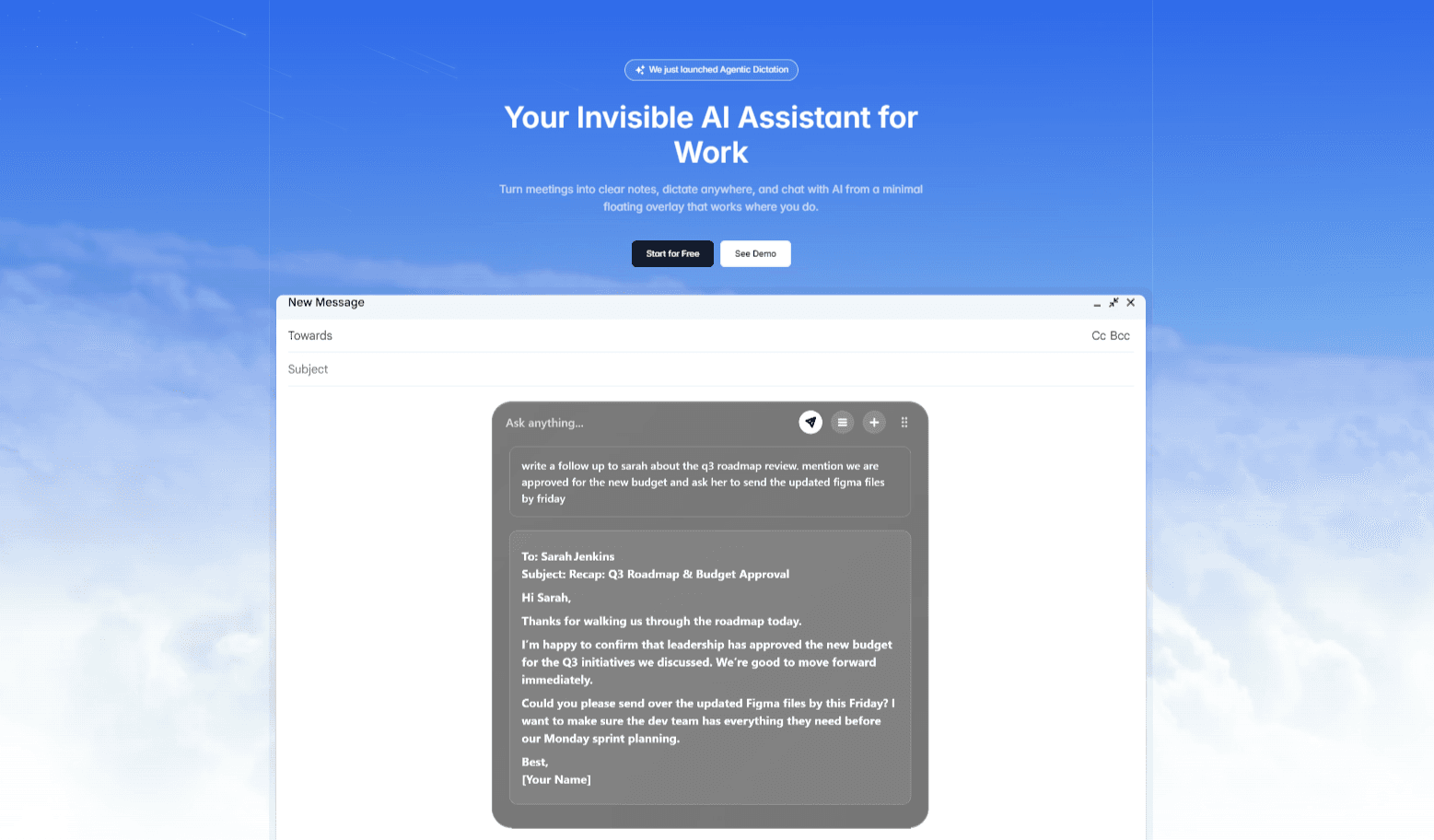
Notto is an invisible AI overlay for desktop computers that functions as a meeting notetaker, universal dictation tool, and AI chat assistant within a single floating interface. Designed for professionals who need to capture information quickly without disrupting their workflow, Notto sits over all applications rather than inside them, appearing only when needed and vanishing when not. Its core value lies in eliminating the friction of switching between separate apps for transcription, dictation, and AI queries. By providing a persistent yet minimal overlay, Notto allows users to maintain focus on their primary tasks while the AI handles the background work of capturing meeting details, converting speech to formatted text, and answering questions in real time. The product targets anyone who attends virtual meetings, writes documents, or needs quick access to AI assistance without leaving their current window.
A key pain point Notto addresses is the inefficiency of manual note-taking during meetings, which often leads to missed details and unclear action items. After a call, many professionals struggle to recall decisions or next steps, wasting time reviewing recordings or searching through scattered notes. Notto solves this by automatically transcribing meetings and generating clean summaries, transcripts, and to-do lists immediately after a call ends. Additionally, typing can be slow and error-prone, especially for long emails or documents. Notto's universal dictation feature lets users speak naturally and see perfectly formatted text appear in any textbox, up to three times faster than typing. This combination of meeting transcription and voice-driven input helps users reclaim hours of lost productivity each week, ensuring that nothing falls through the cracks.
The first major feature group is the AI Meetings Notetaker, which captures every word spoken during a virtual meeting. It works with popular platforms like Zoom, Microsoft Teams, and Google Meet, as confirmed in the product's FAQ. The tool listens to the conversation and produces detailed notes, including a full transcript and a concise summary, all without requiring the user to type anything. This allows meeting participants to fully engage in the discussion, confident that Notto will record all important points. After the meeting, the user receives a structured output with action items and decisions, which can be shared with colleagues to ensure alignment. The benefit is substantial: no more worrying about missing key details or spending extra time rehashing conversations. Teams can move from discussion to action faster.
admin
The second major feature is Universal Dictation, which turns voice input into perfectly formatted text at three times the speed of typing. This feature works in any textbox across the operating system, whether composing an email in a web browser, writing a document in a word processor, or entering data into a form. Notto supports over 100 languages and allows users to create custom dictionaries and snippets for specialized terminology. Dictation is triggered by the overlay, and the text appears inline as if typed. This eliminates the need to switch to a separate dictation app or fix formatting errors manually. For professionals who do a lot of writing—such as journalists, customer support agents, or project managers—this feature dramatically reduces the time spent on text entry while maintaining accuracy and formatting.
The third feature group includes the Seamless Chat Overlay and advanced capabilities available in higher pricing tiers. The chat overlay is a transparent window that floats above all applications, enabling users to converse with an AI assistant without leaving their current workspace. This overlay is discreet and can be hidden or shown on demand. In the Ultra plan, Ghost Mode makes the overlay invisible even during screen sharing, allowing users to take notes or ask questions without participants seeing the interface. Another Ultra-exclusive feature is Agentic Dictation, which interprets the user's spoken intent and drafts complete responses or documents automatically. Additionally, Chat with Your Notes is a forthcoming feature that will let users query past meetings and documents by asking natural language questions, turning the tool into a second brain for instant recall. Share Meeting Notes will also arrive soon, enabling automatic distribution of summaries and action items to all call participants.
Notto works by providing a persistent floating layer that integrates with the desktop environment. The overlay is always available via a hotkey or mouse interaction, but it stays out of sight when not in use. When a meeting starts, the user can enable transcription, and Notto will capture audio from the call. For dictation, the user clicks into any text field and activates the microphone via the overlay; the transcribed text is inserted directly. The AI chat feature functions through the same overlay, allowing the user to type or speak questions and receive answers in real time. The overall workflow is designed to be frictionless: the user never needs to switch windows or open a separate application. Notto's approach is to act as an invisible assistant that enhances every application without modifying them, preserving the user's existing habits and tools.
Concrete use cases demonstrate Notto's impact. After a project kickoff meeting, a product manager receives an automated summary with assigned action items and shares it instantly with the team, ensuring everyone knows their next steps. A sales representative dictates follow-up emails directly into the CRM while reviewing call notes, cutting response time from ten minutes to three. During a screen-share presentation, a trainer uses Ghost Mode to discreetly prompt themselves with key talking points without the audience seeing the overlay. A researcher conducts interviews and later queries the transcripts via Chat with Your Notes to extract specific insights without re-listening to hours of audio. An executive uses Agentic Dictation to draft a quarterly report by simply describing the structure aloud, and the AI produces a well-formatted draft within seconds. Each scenario highlights how Notto reduces manual effort and accelerates outcomes.
Notto is designed for knowledge workers across various roles: remote team members, project managers, sales professionals, customer success managers, content creators, and researchers. It runs on desktop operating systems (Windows and macOS inferred from standard compatibility) and works with common meeting platforms. The pricing model starts with a free Starter plan that includes limited meetings, AI chats, and dictation, along with custom dictionaries and support for over 100 languages. For unlimited usage, the Pro plan costs $20 per month, removing all caps. The Ultra plan at $40 per month adds Ghost Mode for invisible screen sharing and Agentic Dictation for intelligent drafting, plus the ability to chat with unlimited notes. This tiered structure allows users to start free and upgrade as their needs grow. Ultimately, Notto's value proposition is clear: it eliminates the busy work of note-taking and typing, letting professionals focus on what matters most.
Notto is ideal for knowledge workers who regularly attend virtual meetings and need to capture accurate notes without manual effort. This includes project managers overseeing team calls, sales professionals who dictate follow-up emails, customer success managers handling support conversations, remote team members collaborating across time zones, content creators requiring fast dictation, and researchers who need to query past transcripts. It also suits executives and trainers who present frequently and require a discreet AI assistant that remains invisible during screen shares. The tool is designed for anyone using desktop computers who wants to reduce the friction of switching between note-taking, dictation, and AI chat applications.
Updated 2026-02-28