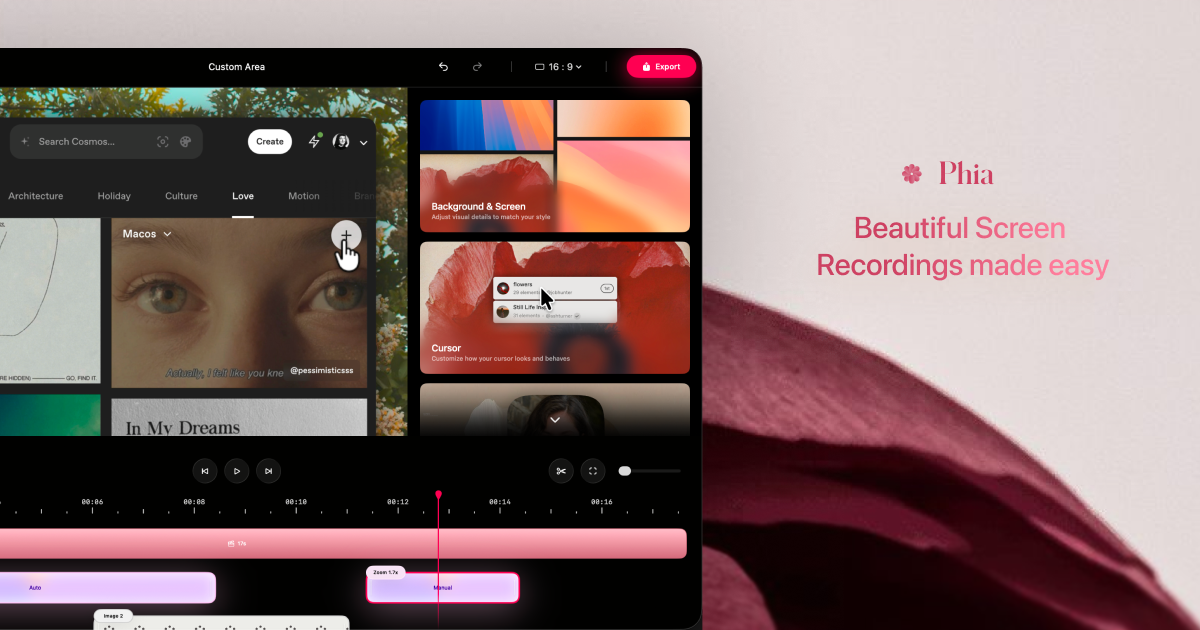
Phia is a native macOS screen recorder designed for creating beautiful screen videos with automatic zoom, smooth cursor motion, and cinematic effects. It helps create engaging demos, tutorials, courses, and social media videos that look polished and ready to share.
Dina is a professional screen recording application built exclusively for macOS, designed for creators, educators, and professionals who need to produce high-quality video content directly from their computer screens. This native app automates the process of adding cinematic polish to recordings, transforming raw screen captures into engaging, presentation-ready videos with minimal manual effort. Its core value lies in automating complex editing tasks like zoom animations, cursor smoothing, and layout integration, allowing users to focus on their message rather than post-production technicalities.
Many content creators struggle with the time-consuming and technically demanding process of editing screen recordings to look professional. Raw screen captures often appear flat, lack visual focus, and require significant post-production work to add zoom effects, smooth cursor movements, and cohesive layouts. Dina addresses this pain point by handling motion, zoom, and clarity automatically during and after recording. This matters because it enables users to produce studio-quality videos without needing advanced video editing skills or spending hours on manual adjustments, making professional video creation accessible and efficient.
The automatic zoom feature represents Dina's first major capability group, intelligently detecting and zooming into key interactions during screen activity. This works through real-time analysis of cursor movements, clicks, and interface changes, applying smooth zoom animations to highlight important areas without user intervention. Users can also choose precise manual control over zoom parameters when specific emphasis is needed. This functionality is particularly useful for software demos and tutorials where guiding viewer attention is crucial, creating clearer and more engaging viewing experiences by eliminating distracting peripheral content and focusing on what matters most.
Complete layouts and annotation tools form the second major feature group, enabling users to bring together multiple visual elements into cohesive scenes. The system supports adding titles, slides, images, and video components that feel balanced and intentional rather than layered as afterthoughts. Specific layout types include Slide Layout for integrating presentation slides with controlled color, timing, and animation, and Text Layout for adding animated text with solid or gradient fills. Additionally, Mask Layout allows flexible multi-region masking to hide sensitive information, while annotation tools provide arrows, highlights, shapes, and callouts that can be timed to appear naturally throughout the recording progression.
Publisher
A
admin
Launch Date2026-01-13
Platformdesktop
Pricingpaid
Tech Stack
#macOS#Apple Silicon#Metal#SwiftUI
Domain Authority
Ahrefs DR13/100
Traffic Insights
Month2026-01
Estimated Visits6.9K
MoM Visits Growth+106.8%