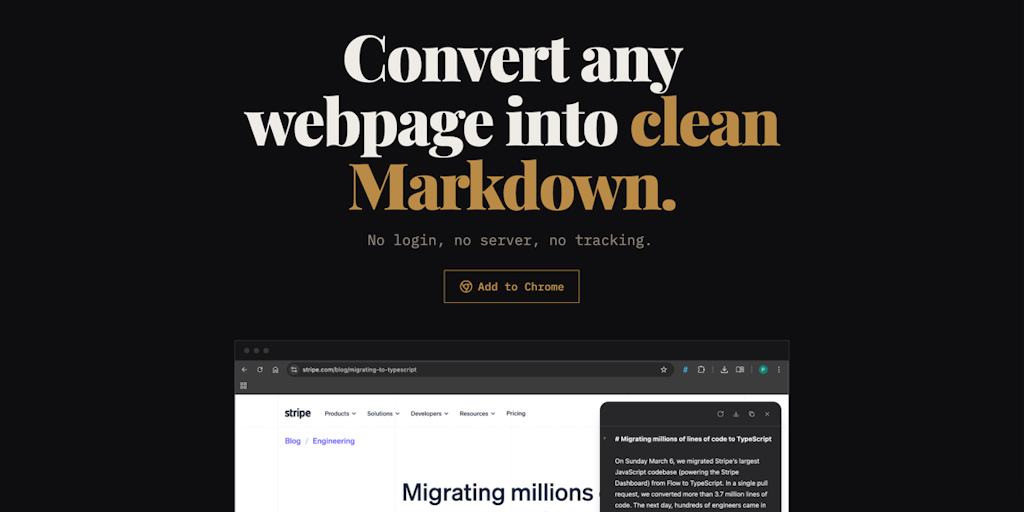
Plain Markdown is a webpage to Markdown converter that functions as a browser extension, allowing users to transform any online article, blog post, or forum thread into clean, readable Markdown with a single click. It belongs to the category of web clipping and content extraction tools, tailored for researchers, students, and AI enthusiasts who need distraction-free text for note-taking or feeding into large language models. Its core value lies in simplicity: no account creation, no login prompts, and zero configuration required. The extension strips away ads, sidebars, navigation menus, and other visual noise, leaving only the article's core content in a structured Markdown format that is universally compatible with note-taking apps, AI tools, and text editors. This makes it an essential utility for anyone who frequently handles web content in knowledge workflows.
The primary pain point Plain Markdown solves is the clutter and inconsistency of extracting meaningful text from web pages for further processing. When users copy-paste from websites, they often get extra formatting, hidden links, or irrelevant snippets, requiring manual cleanup. This is especially problematic for AI prompts, where clean input is crucial for accurate responses, and for note-taking, where formatting consistency saves time. Plain Markdown eliminates these friction points by delivering a standardized Markdown output that preserves headings, lists, tables, code blocks, and hyperlinks in a predictable structure. For researchers who need to cite sources, the extension also includes original source information, ensuring traceability. This reliability makes it a trusted tool in professional and academic environments where accuracy and efficiency matter.
The Capture feature group is the foundation of Plain Markdown, offering one-click conversion across multiple tabs and dynamic websites. When a page is captured, the extension extracts the main content using smart parsing algorithms that ignore non-essential elements. This works seamlessly on sites that load content asynchronously, such as modern JavaScript-heavy applications, as well as on static blogs. The output preserves complex structures like tables and code snippets, which are often lost during simple copy-paste. An inline Markdown editor allows users to review and edit the captured text before sending it to a destination, providing full control over the final format. Additionally, the source URL and metadata are automatically included, making citation effortless. This feature set addresses the need for reliable, high-fidelity web-to-Markdown extraction.
admin
The AI actions feature transforms Plain Markdown from a simple converter into an intelligent assistant. Users can apply curated everyday prompts such as "summarize this article," "rewrite in simpler language," or "extract action items" directly from the side panel. For those with specific needs, the tool allows building custom AI actions using your own instructions. The underlying model for Free and Pro tiers is Google's Gemini 2.5 Flash, which provides fast and context-aware responses. Power users can opt for the BYOK Lifetime plan, which lets them bring their own OpenRouter API key to select from over 200 models across providers like Anthropic, OpenAI, and Google. This flexibility ensures that the AI actions remain useful for diverse tasks, from quick overviews to deep analysis, all without leaving the browser tab.
After capturing and optionally refining content with AI, Plain Markdown provides multiple destinations where users can send their finished Markdown. One-click transfers are available to Obsidian, Readwise Reader, and Notion, with the content arriving fully formatted and ready to integrate into existing notes or databases. Users can also copy the Markdown to the clipboard for pasting into any other application, or download the result as a .md file for offline storage. These integrations are designed to fit seamlessly into common knowledge management workflows, reducing friction between web browsing and documentation. The extension remembers user preferences for frequent destinations, making repeated actions even faster. This approach ensures that captured information flows directly into the user's primary tools without manual export steps.
Plain Markdown operates entirely within the browser ecosystem, requiring no external servers for the conversion step—page content is processed locally to maintain privacy. The extension is available for Chrome, Brave, and other Chromium-based browsers, with Firefox support planned. After installation, a toolbar icon appears; clicking it opens a side panel that shows the converted Markdown of the current page. From there, users can edit, apply AI actions, or send the content to a destination. For AI actions, the relevant page content is sent to Plain Markdown's server (or the user's chosen provider via BYOK) for processing, with no data stored afterward. This architecture balances performance and privacy, giving users confidence that their reading data is not retained unnecessarily.
Concrete use cases demonstrate the tool's versatility. A researcher loading a heavy academic article can convert it to Markdown, apply the summarization AI action to get a one-paragraph abstract, and send both the full text and summary to Obsidian for citation management. A social media analyst monitoring Reddit threads can capture multiple discussions, use the AI checklist extraction action to identify key points, and then copy the results to Notion for team reporting. A developer preparing training data for a chatbot can batch capture 50 webpages via multi-tab capture, edit each in the inline editor to remove unwanted sections, and download the cleaned Markdown files. In every scenario, the outcome is reduced manual effort, higher quality input, and faster integration into the user's workflow. Users consistently save minutes per task, which compounds across a day's work.
The target audience includes knowledge workers, students, researchers, content curators, and AI developers who frequently interact with web content. The product runs on Chromium-based browsers (Chrome, Brave, etc.) with no account needed for the free tier. Pricing is straightforward: a Free plan with 30 AI actions per month, a Pro 100× plan at $29/year for 3,000 AI actions and priority support, and a BYOK Lifetime plan for $19 once that removes action caps and allows any model via the user's own OpenRouter key. Each plan includes core capture and destination features. In summary, Plain Markdown offers an elegant, privacy-conscious solution for converting webpages to Markdown and applying AI actions, making it an indispensable tool for anyone building a knowledge base or working with large language models. Its combination of one-click simplicity and powerful AI integrations sets it apart from traditional bookmarking or clipping tools.
Plain Markdown is designed for researchers, students, content curators, AI developers, and knowledge workers who frequently convert web content into clean Markdown for note-taking, AI prompts, and analysis. It is particularly useful for users of Obsidian, Readwise, and Notion who want to import web content seamlessly. The AI actions appeal to power users who need to summarize, rewrite, or query web pages without leaving their browser. The BYOK plan targets developers and heavy AI users who want to use custom AI models. The free tier makes it accessible to casual users who need occasional conversions.
Updated 2026-03-01