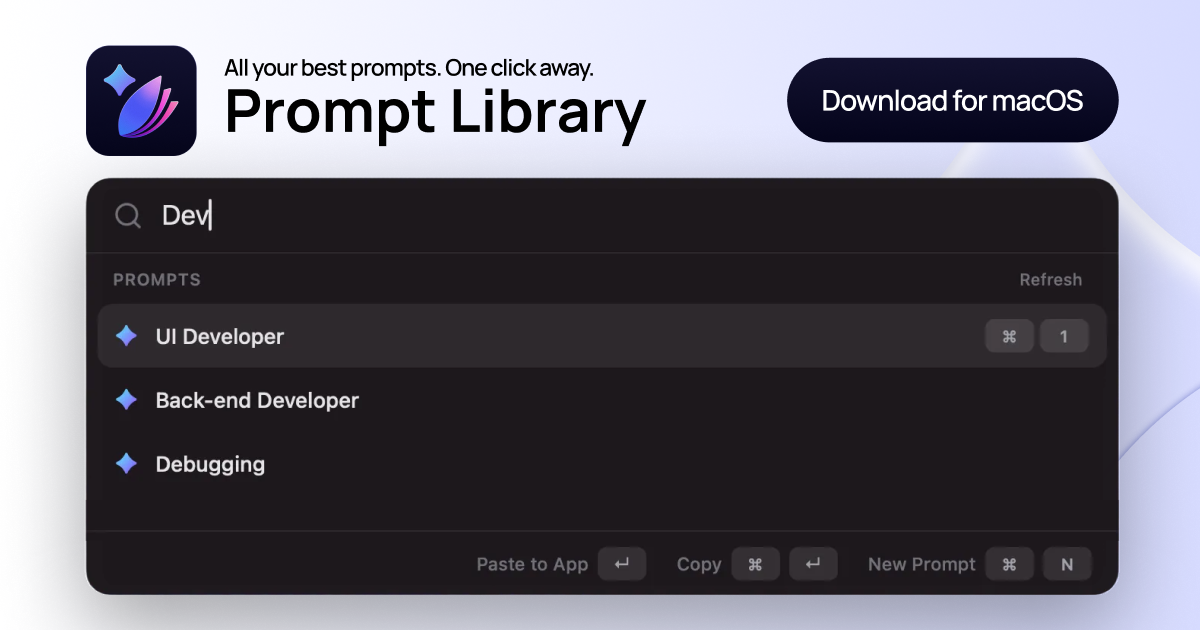
Prompt Library is a dedicated macOS application designed to streamline and enhance the workflow of individuals who frequently use AI tools such as ChatGPT, Claude, and Gemini by providing a centralized system for managing prompts. It serves users who need to efficiently save, organize, and quickly insert proven prompts into any application on their Mac, eliminating the inefficiency of scattered notes and repetitive copying. The primary purpose is to transform disorganized prompt snippets into a structured, easily accessible library that users can launch instantly with a keyboard shortcut, thereby saving time and improving the consistency and quality of AI interactions. This tool is especially valuable for professionals in fields like marketing, product development, engineering, support, and hiring who rely on precise and effective prompts to generate desired outputs from AI models, ensuring that their best instructions are always ready for reuse without breaking their creative or analytical flow.
Many users face significant challenges when working with AI prompts, as valuable instructions often become buried across various platforms like notes apps, browser tabs, and old chat histories, leading to a state of prompt chaos. This disorganization forces individuals to waste time searching for the perfect prompt version, interrupting their workflow and reducing productivity. Repeatedly rewriting or tweaking prompts from scratch not only slows down output but also risks inconsistency and lower quality in AI-generated responses. The problem is compounded by the lack of a dedicated tool to curate and retrieve these prompts efficiently, causing frustration and hindering the ability to leverage past successful interactions effectively. Prompt Library addresses this pain point by offering a clean, searchable system that serves as a single source of truth for all prompts, enabling users to stop copying snippets and start inserting optimized instructions with ease.
One major feature group is the ability to save and organize prompts into collections and tags, allowing users to structure their prompt system by role, project, or use case such as marketing, product, engineering, support, or hiring. This organization ensures that every reusable instruction has a clear home, making it easy to group campaign-ready marketing prompts, role-specific persona prompts, or fast-triage debugging prompts. By building collections for each context, users can keep their proven prompts ready for reuse instead of searching through disparate docs and chats, which enhances efficiency and maintains consistency across similar tasks. This feature works by providing an intuitive interface within the app where prompts can be categorized and labeled, supporting a methodical approach to prompt management that aligns with diverse workflows and professional needs.
admin
Another major feature group is the global launcher shortcut, activated by pressing ⌘⌥P, which enables instant search and insertion of prompts from anywhere on the Mac. This feature allows users to launch the library without switching apps, type what they need in real-time, and surface the exact prompt through fast keyboard navigation, all without breaking their flow. It works by overlaying a searchable interface that filters prompts as you type, providing quick access to saved content and allowing selection with keyboard shortcuts for seamless integration into the current application. The importance lies in its ability to drastically reduce the time spent on prompt retrieval, turning a previously cumbersome process into a one-click action that keeps users focused on their primary tasks rather than administrative overhead.
The app also includes robust prompt insertion capabilities, letting users insert their best prompt directly into the app they are working in with a single click or copy it without inserting using keyboard commands like ↵ for insertion and ⌘↵ for copying. Users can quickly create new prompts with ⌘N, ensuring that the library remains up-to-date with refined and trusted versions. This functionality ensures that prompts are reused accurately every time, eliminating the risk of errors from manual retyping and supporting continuous improvement of prompt quality. By keeping all prompts in one clean app as a single source of truth, Prompt Library enables higher output quality as users rely on instructions that have already proven effective, rather than rewriting from scratch.
Overall, Prompt Library operates as a model-agnostic desktop application that stores everything locally on your Mac, requiring no accounts or cloud connectivity, which ensures privacy and offline accessibility. Its technical approach involves a native macOS interface where prompts are saved in raw text, markdown fenced blocks, JSON, or other formats, and can be sorted by recently updated or alphabetical order for easy management. The app integrates seamlessly with any Mac application through system-level shortcuts and accessibility permissions, allowing prompts to be inserted into AI tools like ChatGPT, Claude, and others without compatibility issues. This straightforward, offline-first design prioritizes user control and simplicity, making prompt management an effortless part of the daily workflow.
Users benefit from measurable outcomes such as reduced time spent searching for prompts, minimized context switching, and improved consistency in AI interactions, leading to higher productivity and output quality. By reusing prompts that have already worked, individuals can achieve more reliable and effective results from AI models, enhancing their creative and analytical processes. The elimination of prompt chaos translates into a smoother workflow where instructions are instantly recallable, allowing professionals to focus on generating insights rather than managing snippets. These benefits are particularly evident in scenarios where prompt precision is critical, as the library ensures that best practices are consistently applied across projects and teams.
Concrete use cases include marketing teams creating campaign-ready prompts grouped by intent, product managers using role-specific persona prompts for user research, and engineers isolating debugging prompts for fast triage in technical support. For example, a content writer can launch Prompt Library with ⌘⌥P while in a writing app, search for a proven blog outline prompt, and insert it directly into ChatGPT to generate a draft without leaving their workflow. Similarly, a hiring manager can organize interview question prompts into a collection and quickly insert them into a conversation with an AI assistant to streamline candidate evaluations. These workflows demonstrate how the app turns scattered prompts into an efficient system that supports diverse professional activities.
Target users include professionals and enthusiasts who regularly use AI tools on macOS, such as marketers, product developers, engineers, support agents, and hiring managers, across various industries. The app integrates with any Mac application and is compatible with popular AI platforms like ChatGPT, Claude, and Gemini, requiring no specific tech stack beyond macOS. Pricing plans consist of a free trial that allows up to 8 prompts with full organization features and a one-time payment of $12.90 for the full app, which offers unlimited prompts and lifetime access without subscriptions. This model caters to both casual users testing their workflow and power users building extensive prompt systems, ensuring accessibility and long-term value.
In summary, Prompt Library fundamentally transforms how individuals interact with AI by providing a centralized, efficient system for prompt management that eliminates disorganization and boosts workflow efficiency. Its combination of organization features, global shortcut access, and seamless insertion capabilities makes it an indispensable tool for anyone seeking to leverage their best prompts consistently and effectively. By turning prompt chaos into a clean, searchable library, the app empowers users to achieve higher quality outputs with less effort, reinforcing its primary value as the fastest way to reuse proven instructions across any AI tool on a Mac.
Prompt Library targets professionals and enthusiasts who regularly use AI tools on macOS, including marketers, product developers, engineers, support agents, and hiring managers. These users need to efficiently manage prompts across platforms like ChatGPT, Claude, and Gemini to enhance productivity and output quality. The app is ideal for individuals facing prompt chaos from scattered notes and browser tabs, seeking a centralized system for saving, organizing, and instantly reusing proven instructions. It caters to both casual users testing workflows with the free trial and power users requiring unlimited prompts with a one-time payment, all within a model-agnostic, offline-friendly environment.
Updated 2026-02-28