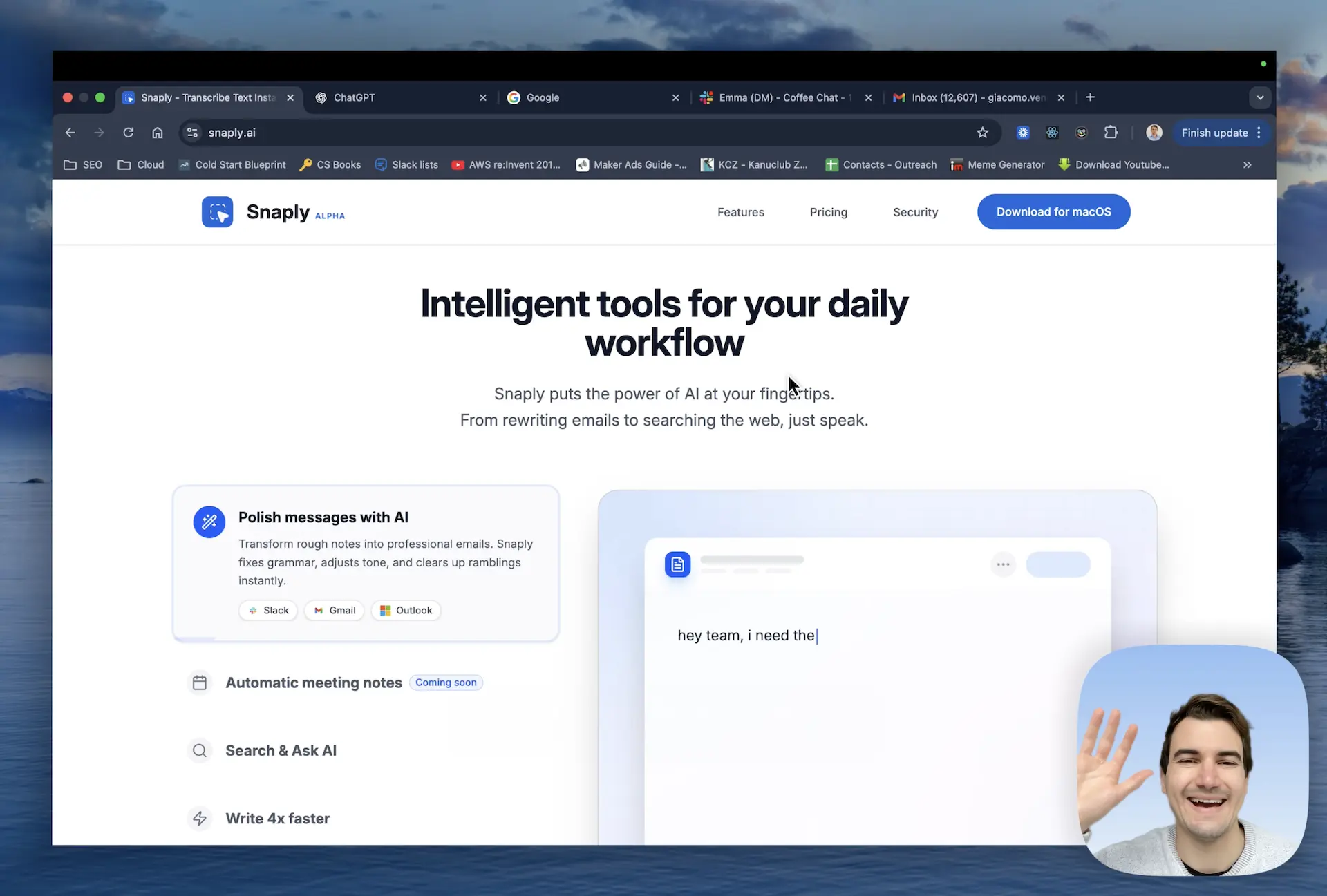
Snaply is an AI dictation for Mac, a desktop application that brings instant voice-to-text capabilities to macOS, designed for professionals, creatives, and anyone who wants to speed up their writing workflow. By running local AI models directly on your device, Snaply converts spoken words into accurate text within any application, from Notion to Gmail, without ever sending your voice data to the cloud. This free tool empowers users to write up to four times faster than typing, eliminating the friction of keyboard input and reducing physical strain. Its core value lies in combining speed, accuracy, and total data privacy, ensuring that every dictated word, meeting transcript, or writing correction remains entirely under your control. Snaply falls into the productivity and AI assistant category, but its on-device approach sets it apart from cloud-dependent services. It is built for the modern Mac user who values efficiency and security.
The typical workflow of drafting messages, taking meeting notes, and fixing grammar errors consumes hours of productive time each week. Typing manually often leads to repetitive strain, distractions from backspacing through typos, and the mental fatigue of staring at a blank page. In meetings, crucial details slip away when notes are incomplete, and action items get lost in endless email threads. For those who work across multiple communication tools like Slack, Microsoft Teams, and Zoom, the context-switching and manual documentation drain energy and focus. Snaply addresses these pain points by offering an all-in-one solution that captures your voice in real time, polishes your rough drafts, and automates meeting documentation. This matters because it directly reduces the busywork that slows down knowledge workers, letting you concentrate on creative thinking and decision-making rather than mechanical typing and note-taking. By keeping all processing on-device, Snaply also eliminates privacy concerns associated with cloud transcription services, a growing worry for professionals handling sensitive information.
The Instant Dictation feature is the heart of Snaply’s offering, allowing you to talk naturally and see your speech transformed into text immediately in any active application. It leverages specialized on-device AI models that are optimized for macOS, providing fast and accurate dictation without requiring an internet connection. When you activate dictation, Snaply listens through your Mac’s microphone and processes the audio locally using Apple's CoreML and the app's proprietary speech engine, which means your voice never leaves your computer. This results in sub-second latency and a high word accuracy rate, even with ambient noise, because the local model can be finely tuned to your voice over time. The benefit is dramatic: you can compose long-form documents, chat replies, or code comments simply by speaking, reducing the physical toll of typing and enabling hands-free operation when needed. Instant Dictation works system-wide, so whether you’re working in Xcode, Google Docs, or Salesforce, the transition from voice to text is seamless and immediate.
admin
Snaply’s Automatic Meeting Notes capability redefines how professionals handle virtual gatherings. It integrates directly with popular conferencing platforms like Zoom, Google Meet, Microsoft Teams, and Webex, joining your meetings to capture audio and generate structured outputs. Once you start a meeting, Snaply records the conversation locally on your Mac, then uses its AI models to transcribe everything and produce a concise summary, a bullet list of key discussion points, and clearly defined action items. The result is a share-ready document that you can refer to later or distribute to attendees without manual note-taking. For instance, after a weekly sync, Snaply might output: “Discussed Q3 roadmap. Team agreed to focus on performance improvements.” and assign action items like “Update documentation” to specific participants. This feature ensures you never miss a detail, even if you step away or multitask, because the entire conversation is captured and processed in the background. The local processing guarantees that sensitive business discussions remain confidential, a critical requirement for legal, financial, and healthcare meetings.
Beyond dictation and meeting notes, Snaply includes a powerful Writing Assistant that elevates your text quality with minimal effort. When you’ve typed or dictated a rough draft—perhaps a quick Slack message or an email draft—Snaply can instantly fix grammar, adjust tone, and clear up ramblings to make your writing sound clearer, sharper, and more natural. It operates with a single click: highlight your text, invoke Snaply’s “Fix” command, and the AI replaces the original with a polished version. For example, a hastily written “Im going to the store do you want anything?” becomes “I'm going to the store. Do you want anything?” complete with proper punctuation and capitalization. This tool understands context and can adapt formal or casual tones, helping you communicate effectively across different platforms like Slack, Gmail, and Outlook. The on-device processing means your message content never travels to external servers, so even confidential internal communications are safe. This feature saves the awkwardness of sending error-ridden messages and the time you’d spend revising them manually.
Two more features extend Snaply’s utility far beyond basic dictation: Search & Ask AI and language translation. With Search & Ask AI, you can stop typing long prompts into ChatGPT, Claude, or Perplexity; instead, you speak your query naturally, and Snaply routes the transcribed text to your chosen AI service, instantly displaying the response. This turns AI interactions into fast, conversational exchanges, ideal for generating ideas, writing code, or getting quick answers while you keep your hands free. The translation feature lets you break language barriers by speaking in your native language and having the text appear in Spanish, French, German, or any of over 100 other languages. For example, you could dictate a message in English to a colleague abroad, but Snaply will output the text in their language directly into WhatsApp or iMessage. Both capabilities run through Snaply’s local engine before interfacing with external services, maintaining control over your original voice data. These tools integrate fluidly into your existing workflow, making cross-lingual communication and AI-assisted research nearly effortless.
In practice, Snaply transforms daily professional tasks. A marketing manager can dictate a full content strategy into Notion while walking, then use the Writing Assistant to refine the draft into client-ready copy. A software engineer can speak directly to Linear or Jira to create bug reports, and later ask Claude to debug a function via voice, all without lifting their hands from the keyboard. During a Zoom meeting, Snaply automatically captures the entire discussion and generates a summary that the project manager shares with the team, ensuring alignment without anyone taking notes. Customer support agents can translate responses on the fly in Gmail, providing multilingual assistance without copy-pasting from a translation tool. These scenarios lead to measurable outcomes: faster turnaround times, fewer errors, reduced mental load, and more inclusive communication across teams. The consistent thread is that Snaply removes barriers between thought and action, enabling a more natural and efficient digital workflow.
Snaply is designed exclusively for macOS and is available as a free download for individuals, with no account creation required—simply install and start using. It is built for a broad spectrum of users who rely on Mac for productivity: writers polishing articles, developers documenting code, marketers drafting campaigns, consultants taking client notes, and remote workers bridging language gaps. Because it processes everything on-device, it is particularly appealing to privacy-conscious professionals in fields like law, healthcare, and finance who cannot risk data leaks via cloud services. Snaply works across the entire Mac ecosystem, integrating with over two dozen apps including Notion, Slack, Salesforce, Figma, GitHub, and Stripe, ensuring it fits into any workflow. The technology stack leverages local AI and Apple’s Secure Core, with an encrypted file system that guarantees data protection. In summary, Snaply is not merely a dictation application; it is a comprehensive on-device AI companion that accelerates writing, automates meeting documentation, and enhances communication, all while keeping your data 100% private and under your control.
Snaply is designed for Mac users across professions who write frequently and value privacy. It appeals to writers, bloggers, and content creators who need fast dictation and editing; marketers and sales professionals managing emails and meeting notes; developers and engineers who want to query AI assistants or document code by voice; remote workers and freelancers juggling multiple communication platforms; and privacy-conscious individuals in healthcare, legal, or finance sectors who require on-device processing of sensitive conversations. Its free, no-account model makes it accessible to students and anyone looking to boost productivity without subscriptions.
Updated 2026-02-28