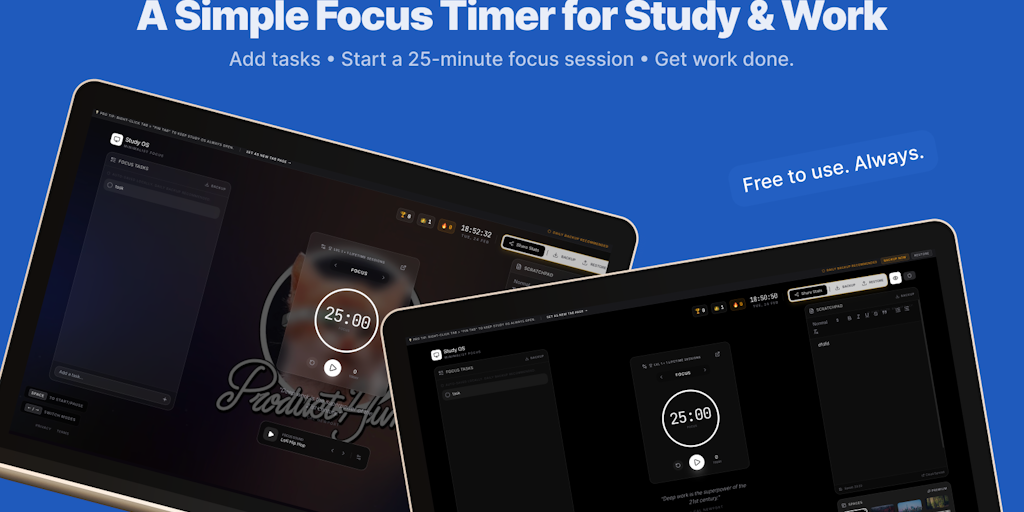
Study OS is a distraction-free workspace designed specifically for students and deep workers who need to maintain intense focus during study or work sessions. The product combines a Pomodoro timer, a lightweight task manager, a scratchpad for notes, ambient study music, daily motivational quotes, and customizable backgrounds into one unified browser-based environment. By serving as a new tab page or a standalone web app, it replaces the typical cluttered new tab with a minimalist focus hub. This core value proposition—reducing distraction while providing essential productivity tools—makes it a compelling alternative to switching between multiple apps and websites.
The primary pain point that Study OS addresses is the constant battle against digital distractions. Modern students and knowledge workers face notifications, social media, and endless tabs that fragment attention and reduce deep work quality. Without a structured environment, even short study sessions can devolve into multitasking. Study OS solves this by creating a dedicated digital space where only focus-related tools are visible. The Pomodoro timer enforces time-boxed work intervals, while the task manager and scratchpad keep planning and note-taking within the same view. The backdrop of study music and quotes further insulates the user from external noise, directly targeting the problem of maintaining sustained concentration.
The Pomodoro timer is the first major feature group. Users can start a default 25-minute focus session or adjust the interval. The timer is controlled by the spacebar, and sessions are tracked as part of a gamified system. After each session, users earn experience points, contributing to level-ups and a streak count. This feature works by breaking work into manageable chunks, reducing mental fatigue, and providing a clear end point. The benefit is improved time management and a sense of accomplishment as users accumulate sessions, levels, and streaks. The timer also switches between focus and break modes, with the next mode accessible via arrow keys, keeping the workflow seamless.
The second feature group combines the Focus Tasks list and the Scratchpad. The tasks section is a lightweight, auto-saved list where users can type items without extra frills. It is designed for quick capture rather than project management. The scratchpad serves a similar purpose for free-form notes—it auto-saves locally and shows the last save time. Both features are integrated into the same view as the timer, so there is no need to open separate tabs or apps. The benefit is reduced context switching: users can jot down a task or idea without leaving the focus environment. Daily backup is recommended to prevent data loss, and the local storage ensures privacy.
admin
The third feature group includes the focus sound and daily quotes. The focus sound offers ambient audio, with Lofi Hip Hop explicitly mentioned as one option. This replaces the need for a separate music app or playlist, keeping everything inside the workspace. The daily quote appears below the timer and provides a short motivational message. The quote source is shown as "— Unknown" in the sample, but it changes daily. These two features cater to the psychological aspect of focus: the music reduces ambient noise and creates a consistent atmosphere, while the quote offers a quick mental reset. Additionally, custom backgrounds allow users to personalize the workspace, which can enhance comfort and ownership of the environment.
Overall, Study OS operates as a browser-based productivity hub optimized for single-session use. It can be set as the new tab page in Chrome, ensuring that every new tab opens to the focus workspace instead of a search engine. The interface is minimalist, with a clean layout showing the time, date, and core elements. Users interact via keyboard shortcuts: space to start/pause the timer, left/right arrow keys to switch between focus and break modes. The gamification system—levels, trophies, and streaks—provides extrinsic motivation to maintain consistency. All data is auto-saved locally in the browser, and daily backup is strongly recommended. The product’s approach is to lower the barrier to entering a focused state by eliminating setup time.
Concrete use cases include a student preparing for finals who uses the Pomodoro timer to study in 25-minute blocks, tracking progress through levels and streaks. A freelance writer might open the scratchpad to draft ideas while listening to Lofi Hip Hop, using the timer to enforce writing sprints. A software developer can work on a complex coding task, checking off small items in the task list and accumulating sessions as a measure of deep work hours. In all scenarios, the outcome is a structured, distraction-minimized environment that yields higher output and less mental exhaustion. Users report feeling more accountable because the streak and level system gamifies daily consistency.
Study OS targets students, remote workers, freelancers, and anyone who engages in deep work. It runs in any modern browser and does not require sign-up or account creation. The platform is entirely web-based, making it accessible on desktops and laptops. No pricing or tier information is mentioned, suggesting it is free to use. The tech stack is simple: local storage for data, and standard web technologies for timers and audio. By combining a Pomodoro timer, task manager, scratchpad, music, quotes, and backgrounds in one distraction-free workspace, Study OS delivers a complete focus toolkit without the bloat of traditional productivity suites.
Study OS is designed for students at any level who need to maintain focus during exam periods or daily study routines. It also serves remote workers, freelancers, and knowledge professionals who practice deep work—such as writers, programmers, researchers, and designers. The tool appeals to anyone who values a minimalist, distraction-free environment and wants to combine Pomodoro time management with lightweight task and note-taking features. It is particularly suited for individuals who prefer browser-based tools over native apps and who appreciate gamification as a motivational driver. No sign-up is required, making it accessible to privacy-conscious users. The product is ideal for people who struggle with digital distractions and seek a unified workspace to replace multiple tabs and apps.
Updated 2026-03-01