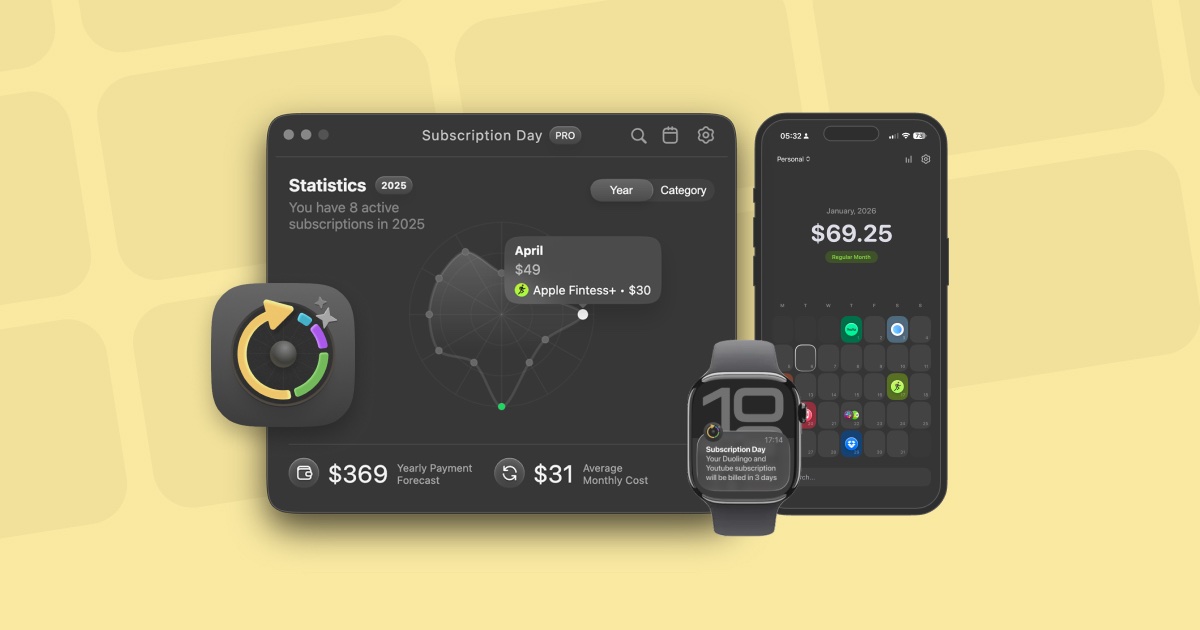
Subscription Day² is a comprehensive subscription management application designed specifically for Mac and iOS users who need to track and analyze their recurring payments across various services. The app serves individuals and households who want to maintain full visibility and control over their subscription expenses, providing a centralized platform to monitor upcoming charges, analyze spending patterns, and optimize their recurring payment portfolio. Its primary purpose is to eliminate the confusion and financial surprises that often accompany modern subscription-based services by offering clear visualization, intelligent organization, and powerful analytical tools that transform subscription management from a chore into an insightful financial practice.
In today's digital economy, consumers face a growing problem of subscription overload, where numerous services charge recurring fees that accumulate silently across different billing cycles and payment methods. This creates significant pain points including unexpected charges, difficulty tracking renewal dates across multiple platforms, lack of visibility into total monthly spending, and challenges comparing subscription costs in different currencies. Users frequently struggle with manual tracking methods like spreadsheets or calendar reminders that become cumbersome to maintain and fail to provide meaningful insights about their subscription portfolio's overall financial impact and optimization opportunities.
The app's intuitive calendar interface represents its first major feature group, replacing complicated lists with a visual mini-calendar that displays subscriptions and upcoming charges at a glance. This visual approach works by mapping subscription renewals directly onto calendar dates, allowing users to see payment patterns, identify clustered payment periods, and anticipate cash flow impacts throughout the month. The calendar interface matters because it transforms abstract payment dates into spatial relationships that the human brain processes more naturally than lists, enabling faster recognition of payment patterns and reducing the cognitive load required to manage multiple subscriptions with different billing cycles and frequencies.
Multi-currency support constitutes the second major feature group, with the app supporting 168 different currencies and automatically converting them to a single selected currency at current exchange rates. This functionality works by allowing users to add subscriptions in their native currencies while the system performs real-time conversions based on up-to-date exchange data, presenting all costs in a unified monetary value for easy comparison and total calculation. This feature matters tremendously for global users and travelers who subscribe to services from different countries, eliminating manual conversion calculations and providing accurate international spending visibility that reflects true costs regardless of currency fluctuations and geographical service origins.
admin
Fast adding capabilities represent the third feature group, where the application automatically finds logos, selects colors, and assigns categories when users simply enter subscription names. This semi-automatic approach works by leveraging intelligent recognition algorithms that match entered service names against an extensive database of subscription providers, then applying consistent visual branding and organizational taxonomy without requiring manual configuration. This matters because it dramatically reduces the friction of initially populating the subscription database, encouraging comprehensive tracking rather than partial adoption, while ensuring visual consistency and proper categorization that enhances later analytical capabilities and interface clarity.
The product works overall through a native application architecture available for macOS 14.0+ and iOS 17.0+, with a synchronized experience across desktop and mobile platforms using iCloud for seamless data continuity. Its technical approach centers on local data storage with optional cloud synchronization, ensuring privacy while maintaining accessibility across Apple ecosystem devices. The system processes subscription data through multiple analytical engines that calculate statistics, generate visualizations, and provide insights while maintaining a lightweight, responsive interface that feels native to each platform's design language and interaction patterns.
Users benefit from measurable outcomes including complete subscription visibility, reduced unexpected charges through proactive notifications, optimized spending through analytical insights, and significant time savings compared to manual tracking methods. The app delivers concrete financial benefits by helping users identify unnecessary subscriptions, recognize spending patterns, and make informed decisions about which services to keep, cancel, or modify based on actual usage and value received versus cost incurred. These benefits translate to both immediate financial savings and long-term financial awareness that improves overall money management practices.
Concrete use cases include individuals managing personal entertainment subscriptions like Netflix and Spotify, professionals tracking business software subscriptions, households coordinating shared family services, and freelancers monitoring multiple professional tools. Specific workflow examples show users importing existing subscription lists from Notion or Google Sheets, setting up notifications before each renewal date, analyzing which categories consume the largest budget share, identifying months with particularly high cumulative payments, and exporting data to CSV for further analysis or sharing with financial advisors or family members for collaborative budgeting discussions.
Target users include Apple ecosystem consumers who use Mac, iPhone, and Apple Watch devices, individuals with multiple digital subscriptions across entertainment, productivity, and utility services, budget-conscious households seeking to optimize recurring expenses, and professionals managing business-related software subscriptions. The app integrates with Apple's native ecosystem through iCloud synchronization, calendar integration, and Apple Reminders connectivity, while supporting imports from App Store purchase history, Notion databases, and Google Sheets. Pricing follows a freemium model with a free version containing limitations and a PRO version available as a one-time lifetime purchase rather than recurring subscription.
In summary, Subscription Day² delivers primary value by transforming subscription management from a fragmented, stressful task into an organized, insightful practice through its visual calendar interface, multi-currency intelligence, and seamless Apple ecosystem integration. The application addresses the modern problem of subscription sprawl with thoughtful design that emphasizes usability while providing depth through statistical analysis and flexible notification systems. By combining intuitive interaction with powerful backend processing, it enables users to regain control over their recurring digital expenses and make informed decisions that optimize both their finances and their digital service portfolios.
Apple ecosystem users with Mac, iPhone, and Apple Watch devices who need to manage multiple digital subscriptions. This includes individuals with personal entertainment and productivity subscriptions, budget-conscious households coordinating shared services, freelancers and professionals tracking business software tools, and international users dealing with multi-currency subscriptions. The app specifically targets those frustrated with manual tracking methods who want visual organization, analytical insights, and seamless cross-device synchronization within the Apple environment.
Updated 2026-02-28