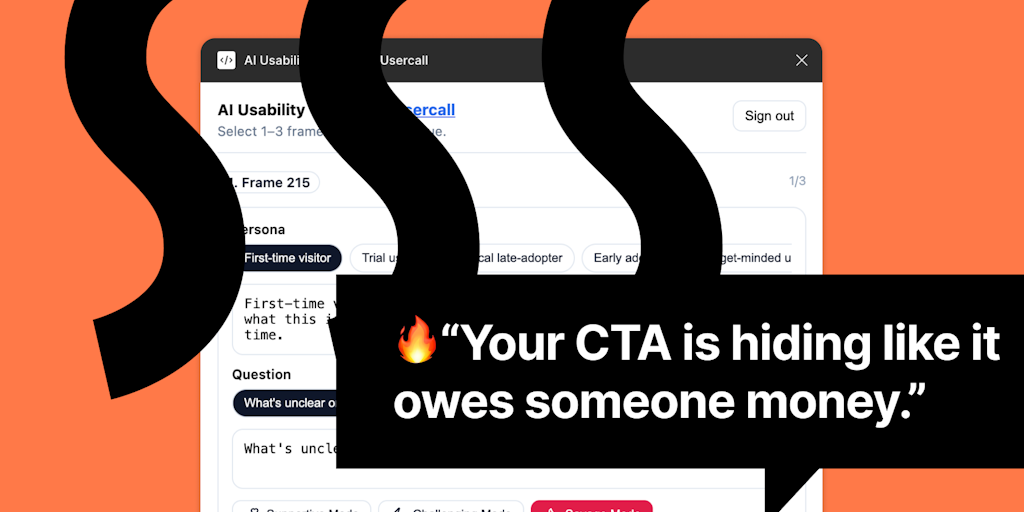
UI Roast is an AI usability testing plugin for Figma that puts instant, brutally honest UX critique directly into the hands of designers inside their familiar canvas. Built for fast-moving sprints and iterative design teams, the plugin uses artificial intelligence to evaluate your frames, identify friction points, and give actionable feedback in seconds. Instead of waiting for scheduled user tests or relying on subjective opinions, UI Roast lets you simulate the perspective of a target user persona and ask a key question about your design. The result is a detailed roast that exposes uncomfortable truths about confusing flows, misleading calls-to-action, onboarding hurdles, and risky assumptions baked into the prototype. This feedback loop is designed to replace guesswork with evidence, enabling teams to iterate with confidence and reduce the risk of shipping a broken experience. By embedding AI usability testing inside Figma, UI Roast shortens the path from idea to validated interface, making it an essential quality checkpoint for designers, product managers, and developers who need to move fast without sacrificing usability.
Designers often ship interfaces that feel intuitive to them but confuse real users, leading to late-stage rework and missed business goals. The pain point is the gap between craft and comprehension: a button that looks obvious to its creator may be invisible to a first-time visitor, and a flow that feels logical can lose half the users before they reach the goal. Traditional usability testing, while valuable, introduces delays, requires recruiting, and often arrives too late in the sprint to matter. UI Roast solves this by giving every designer an immediate, AI-powered usability gut check. It acts like a no-nonsense colleague who points out where users will stumble, highlighting the exact elements that break the experience. This matters because the cost of fixing a confusing flow after launch is exponentially higher than catching it during the earliest wireframe stage. By surfacing problems while you are still pushing pixels, the plugin prevents the cycle of shipping, observing, and patching, and instead builds quality into the design from the start.
The first major feature group revolves around the three-step feedback workflow: select your frames, choose a persona, and ask your key question. Within Figma, you simply highlight one or more frames that represent a user flow or screen you want to test. Then you pick from a set of predefined personas—such as a first-time visitor, a power user, or a specific customer segment—which tells the AI what perspective to adopt. Finally, you pose a single question that focuses the evaluation, for example, "Can the user complete a purchase in under two minutes?" or "Will a new user understand this onboarding screen?" The AI processes the visual layout, copy, hierarchy, and interaction cues within the frames, and returns a candid roast that flags problems with concrete references to the design elements. This feature is useful because it turns abstract usability principles into contextual, actionable critique tied directly to your own work, eliminating the need to translate generic guidelines into your specific interface. The speed—feedback in seconds—keeps the design momentum going without forcing you to switch tools or wait for external input.
admin
A second major feature group is the system's ability to surface four specific categories of usability issues: confusing flows, unclear UI and CTAs, onboarding friction, and risky product assumptions. When you trigger a roast, the AI does not simply say something is wrong; it names the type of failure it detected. Confusing flows are identified by analyzing navigation logic, screen transitions, and the match between user mental models and the presented path. Unclear UI and CTAs cover elements like buttons that blend into backgrounds, labels that use jargon, or calls-to-action that lack visual priority. Onboarding friction examines the critical first moments a user sees the interface: whether the value proposition is instantly clear, whether the first action is obvious, and whether common points of drop-off are present. Risky product assumptions dig into the thinking behind the design, challenging beliefs like "users will scroll" or "this icon is universally understood." By naming these categories explicitly, UI Roast gives designers a structured report that maps issues to specific UI elements, making it easier to prioritize fixes and explain decisions to stakeholders.
The plugin also integrates with UserCall, an AI-moderated voice interview platform, to create a seamless bridge from automated critique to real user validation. After roasting your frames inside Figma and fixing the most obvious flaws, you can take the same design and launch up to ten real AI-moderated voice interviews within twenty-four hours—no scheduling, no manual moderation, no recruiter delays. This extension turns the roast-and-validate philosophy into a continuous design loop: the plugin catches the low-hanging usability failures, and UserCall gathers authentic human feedback on the improved version, complete with transcripts and highlights. For a team sprinting toward a launch, this combination means you can roast a prototype on Monday, address the top issues by Tuesday, run voice interviews by Wednesday, and use real evidence to align the team by the end of the week. The integration reinforces the core promise of replacing opinion with user proof and shipping with confidence.
Overall, UI Roast operates as an inline Figma plugin that runs AI analysis on the visual and textual content of your selected frames. Once installed from the Figma Community, it appears in your plugin panel and runs entirely within the editing environment—no exports, no separate dashboards. The workflow is intentionally minimal: you stay in flow, select the artboards you care about, choose a testing persona, type a question, and press run. The AI engine evaluates layout, contrast, readability, cognitive load, and standard usability heuristics relative to the chosen persona, then compiles its feedback into a concise roast delivered right on the canvas. The approach is diagnostic rather than prescriptive, meaning it highlights what may fail rather than dictating a specific redesign, which keeps the designer in charge of the solution while providing the honest evidence needed to make informed decisions. Because the plugin respects Figma's restricted network access model and uses only the frames you explicitly select, your design files remain private and secure throughout the process.
Concrete use cases abound for teams working under tight deadlines. In a sprint review, a designer can roast a half-finished prototype ten minutes before the demo, identify the most glaring confusion points, and quickly tweak labels or rearrange screens so the stakeholder walkthrough goes smoothly. During prototype testing, the plugin acts as a pre-filter so that the expensive user tests focus on deeper problems rather than surface-level interface glitches that a roast would have caught. For pre-launch checks, a product lead can run UI Roast on every key flow in the release candidate, flagging risky assumptions and last-minute friction before a single line of code goes live. Iterative design polishing also benefits: a designer can roast a screen, apply the suggested fixes, then re-roast it to measure improvement, turning usability into a measurable, trackable quality metric. The outcome in each case is faster discovery of real problems, reduced reliance on hunches, and a more defensible design rationale when explaining why certain changes were made.
UI Roast is built for anyone working inside Figma who cares about the quality of the user experience but does not have the luxury of waiting for formal usability studies. The primary audience includes UX designers, product designers, and UI designers who need a quick, honest second pair of eyes on every iteration they produce. Product managers who oversee sprint cycles and gate launches will find it invaluable for pre-release sanity checks. Design agency teams that juggle multiple client projects can use it to maintain quality across fast turnarounds without adding headcount. Because the plugin is distributed under the Figma Community Free Resource License, it is accessible to individual freelancers and enterprise teams alike at no cost. Its tight integration with Figma and optional connection to UserCall for real voice interviews makes it a flexible tool that scales from a solo designer roasting a landing page to a sprint team validating a complex multi-screen app. In the end, UI Roast equips Figma users with an always-available AI usability tester that cuts through the noise and tells you what needs to change before your users ever see the screen—helping you ship better designs, faster.
UX designers and product designers who need rapid, AI-driven usability validation inside Figma without breaking their creative flow. The tool is also ideal for UI designers iterating on interface details, design team leads who want to reduce guesswork before costly user testing, and product managers overseeing sprint cycles and pre-launch quality gates. Design agency professionals managing multiple client projects will appreciate the instant feedback that keeps tight deadlines from compromising usability, while in-house design squads in fast-moving tech organizations can bake this into their regular design critique and handoff processes.
Updated 2026-02-28