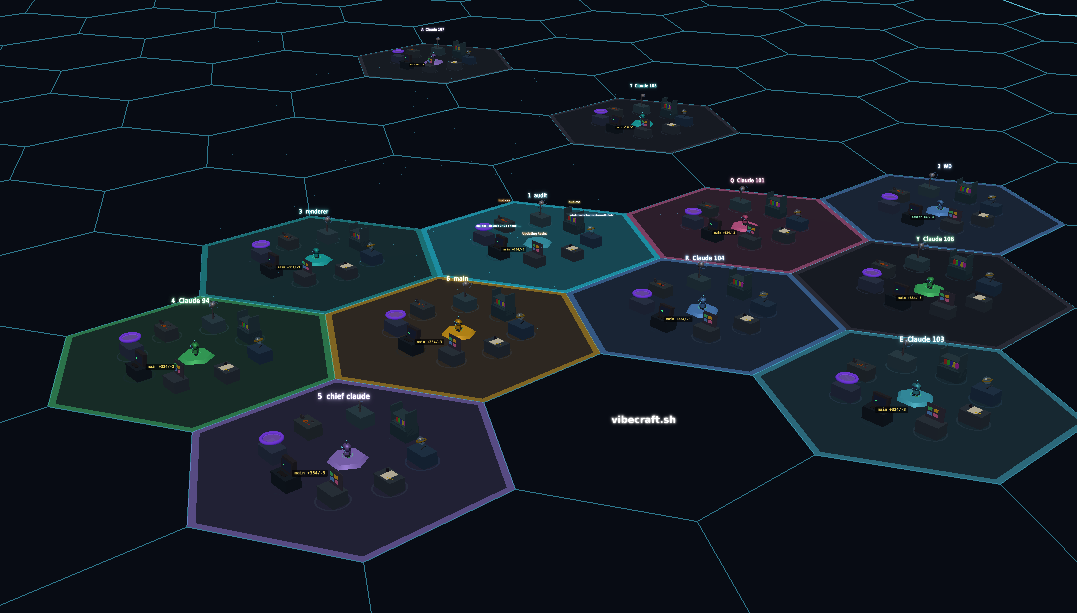
Vibecraft is a 3D visualization app for Claude Code that lets you watch and manage your claudes in real-time. It syncs with Claude Code instances running on your local machine without sending files or code to the web server.
Vibecraft is a groundbreaking Claude Code 3D visualization tool that transforms how developers interact with their AI coding sessions. Instead of juggling multiple terminal windows and text-based interfaces, users gain a dynamic hexagonal grid where each Claude Code instance becomes an interactive zone. This web-based dashboard is purpose-built for software engineers, AI researchers, and DevOps professionals who routinely run several Claude agents in parallel. The core value is spatial awareness: you see all active sessions at a glance, track their outputs, and step in exactly when needed – all without ever leaving a single unified view. Because Vibecraft runs locally and connects only to processes on your own machine, your code and conversations stay completely private, never touching an external server.
Managing multiple Claude Code instances from a traditional command line can quickly become chaotic. Sessions sprawl across tabs, important permission requests get buried, and you may miss a critical input request while focused on another task. This fragmentation slows down development and increases the cognitive load of monitoring autonomous AI agents. Vibecraft directly addresses this pain point by consolidating every running claude into one spatial landscape. The visual layout reduces context-switching; instead of memorizing which terminal corresponds to which project, you see color-coded hexes arranged on a grid, each representing a separate agent. That means you immediately know where an alert originates and can respond in seconds, dramatically improving responsiveness and reducing the frustration of lost sessions.
At the heart of the interface is the real-time hexagonal grid display. Each hexagon animates to reflect activity, whether it’s waiting for a response, processing a command, or encountering an error. The grid is generated by a local agent that listens on a configurable port (default localhost) and relays state changes from Claude Code hooks directly to the browser. This architecture guarantees zero data leakage: the web server at vibecraft.sh serves only the UI assets, while all sensitive information stays on your machine. The visual feedback includes session counts, a quick jump-to-latest button, and a focus mode (Tab key) that centers and enlarges a specific zone for detailed interaction. This spatial approach gives you the power to oversee an entire fleet of AI assistants without drowning in terminal outputs.
The session management capabilities go far beyond passive observation. From the New Zone panel, you can spawn fresh Claude Code sessions with explicit parameters: set a working directory, pass -c to continue a previous session, or even activate Chrome mode for web automation tasks. You can also selectively skip permissions with --dangerously-skip-permissions, giving you fine-grained control over how autonomous each agent is. The All Sessions list provides a refreshable overview, and if a zone becomes unresponsive, embedded troubleshooting tools let you attach to the underlying tmux session directly via tmux ls and tmux attach. This tight integration with the host environment means you never feel disconnected from the raw terminal – the visual layer augments, rather than replaces, your existing workflows.
Publisher
A
admin
Launch Date2026-01-18
Platformweb
Pricingfree
Tech Stack
#Claude Code#Deepgram API#tmux
Domain Authority
Ahrefs DR8/100
Traffic Insights
Month2026-01
Estimated Visits23.3K
MoM Visits GrowthN/A(+23.3K)
Avg Time on Site53s