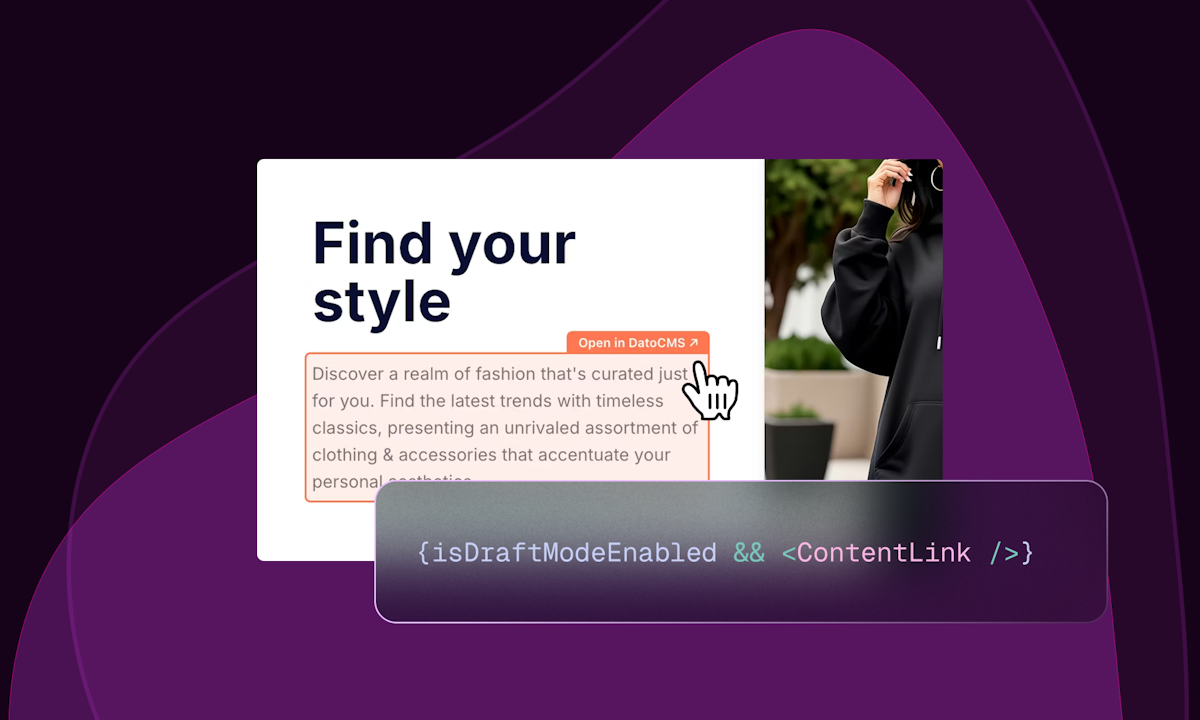
Visual Editing by DatoCMS is a feature designed specifically for content editors working within a headless CMS environment, enabling them to interact directly with the live or draft version of a website to make content modifications in a visually intuitive manner. This tool is built for teams that need to manage and update digital content efficiently across various platforms without requiring deep technical knowledge, allowing editors to see changes in context as they edit. By integrating seamlessly with DatoCMS's existing content management infrastructure, Visual Editing bridges the gap between traditional CMS interfaces and modern headless architectures, providing a user-friendly editing experience that reduces reliance on developers for simple content updates. The primary purpose is to streamline the content editing workflow, making it faster and more accurate by letting editors click on text, images, or other elements directly on the webpage to edit them, thus eliminating the need to hunt through backend forms and reducing errors.
Many organizations struggle with legacy content management systems that force content teams to work in siloed, non-visual interfaces, leading to inefficiencies and out-of-sync content across different digital channels. Editors often face the tedious task of navigating complex record forms and guessing how changes will appear on the frontend, which slows down publishing and increases the risk of mistakes. This disconnect between content entry and presentation can result in inconsistent brand messaging, poor customer experiences, and increased dependency on IT support for even minor updates. Visual Editing addresses these pain points by providing a direct, in-context editing environment that mirrors the final user interface, allowing editors to work more autonomously and confidently.
The core feature of Visual Editing is its ability to let editors click on any element of the website directly within the DatoCMS interface to edit it, which works by overlaying editable regions on top of the live or draft site preview. This is combined with draft mode, allowing editors to make and review changes without immediately publishing them, and real-time updates that reflect edits instantly in the preview. The system identifies content blocks tied to DatoCMS records and makes them interactive, so clicking a headline or paragraph opens the corresponding field in the CMS for editing. This direct manipulation reduces the cognitive load of switching between backend forms and frontend views, ensuring that what editors see is exactly what will be published, thereby minimizing errors and speeding up the content iteration process.
admin
Another major feature group is the integration with DatoCMS's broader ecosystem, including real-time API updates and collaborative workflows that support team-based content creation. As editors make changes using Visual Editing, the modifications are propagated through DatoCMS's real-time API, enabling instant preview updates and allowing multiple team members to see edits simultaneously. This facilitates collaboration, as content creators, marketers, and developers can review changes together in a shared environment. The feature also supports structured content models, so edits made visually are automatically validated against predefined schemas, maintaining content integrity and consistency across all digital touchpoints.
Additional capabilities include support for omnichannel content delivery, where edits made via Visual Editing are automatically available via API for use on websites, mobile apps, chatbots, and other digital products. The tool works with DatoCMS's global CDN, ensuring that content changes are delivered quickly and reliably worldwide. It also integrates with workflows and approval processes, allowing editors to propose changes that can be reviewed and published by authorized users. This extensibility means Visual Editing is not just a standalone tool but part of a comprehensive content platform that scales from small blogs to large enterprise deployments with multiple locales and roles.
Technically, Visual Editing operates by embedding a script into the website that communicates with DatoCMS, enabling the click-to-edit functionality and synchronizing content between the CMS and the frontend. It leverages DatoCMS's GraphQL API to fetch and update content in real-time, and uses draft mode to isolate unpublished changes from the live site. The approach is designed to be framework-agnostic, working with popular technologies like Next.js, React, Vue.js, and others, without requiring significant code changes. This technical foundation ensures that Visual Editing is performant, secure, and compatible with modern web development practices, providing a seamless editing experience regardless of the underlying tech stack.
Benefits for users include measurable outcomes such as faster time-to-market for content updates, reduced reliance on developer resources for minor edits, and improved content accuracy due to in-context editing. Editors can make changes in hours instead of days, leading to increased productivity and the ability to iterate quickly on marketing campaigns or product launches. The visual feedback loop reduces training time for new team members and decreases the likelihood of publishing errors, which enhances overall content quality. For businesses, this translates to better customer experiences, as content can be updated rapidly to reflect current information, promotions, or brand messaging across all channels.
Concrete use cases include e-commerce sites where product descriptions and promotional banners need frequent updates; marketing teams can click on a banner directly on the homepage to change its text or image without developer intervention. Another example is multi-locale websites, where editors managing content for different regions can visually edit translated versions, ensuring that layout and formatting remain consistent. Media companies can use Visual Editing to quickly update article headlines or images on their sites, while educational institutions might edit course descriptions or event details directly on the webpage. These workflows demonstrate how Visual Editing simplifies content management across diverse scenarios, from simple blog posts to complex, structured digital experiences.
Target users are primarily content editors, digital marketers, and non-technical team members who manage website content, but the feature also benefits developers by reducing the volume of content-related support requests. Integrations include compatibility with DatoCMS's full feature set, such as the Schema Builder, Images API, Video API, and plugins, as well as external tools via API connections. The tech stack is based on modern web standards, and pricing plans are available on DatoCMS's website, ranging from free tiers to enterprise solutions, making Visual Editing accessible to teams of all sizes. This ensures that organizations can adopt the tool according to their specific needs and scale.
In summary, Visual Editing by DatoCMS provides a transformative editing experience that empowers content teams to work more efficiently and accurately within a headless CMS framework. By enabling direct, in-context edits combined with real-time updates and draft mode, it addresses common pain points of traditional content management, reducing errors and speeding up workflows. The feature integrates seamlessly with DatoCMS's platform, supporting scalable, omnichannel content delivery and collaborative processes. Ultimately, Visual Editing reinforces DatoCMS's value as a user-friendly, performant headless CMS that bridges the gap between developers and content creators, helping businesses deliver better digital experiences.
Visual Editing by DatoCMS targets content editors, digital marketers, and non-technical team members who manage website content and need an intuitive, efficient way to make updates without relying on developers. It is also beneficial for developers seeking to reduce content-related support requests and for businesses of all sizes that require scalable, omnichannel content management. The tool suits organizations using modern web technologies like Next.js, React, or Vue.js, and those with multi-locale or complex content workflows, from small blogs to large enterprises.
Updated 2026-02-28